



Placing Holds / Asking for Recommendations
These options are available for items that are currently checked out, currently on the shelves, and MelCat items.
Pickup Locations
You are notified when your item(s) are ready/available and the pickup deadline for those item(s).
Hold Pickup Shelves
The Hold Pickup Shelves are located in the front of the building in the hallway to the left of the front desk. Items may be picked up during regular library hours
Curbside Pickup
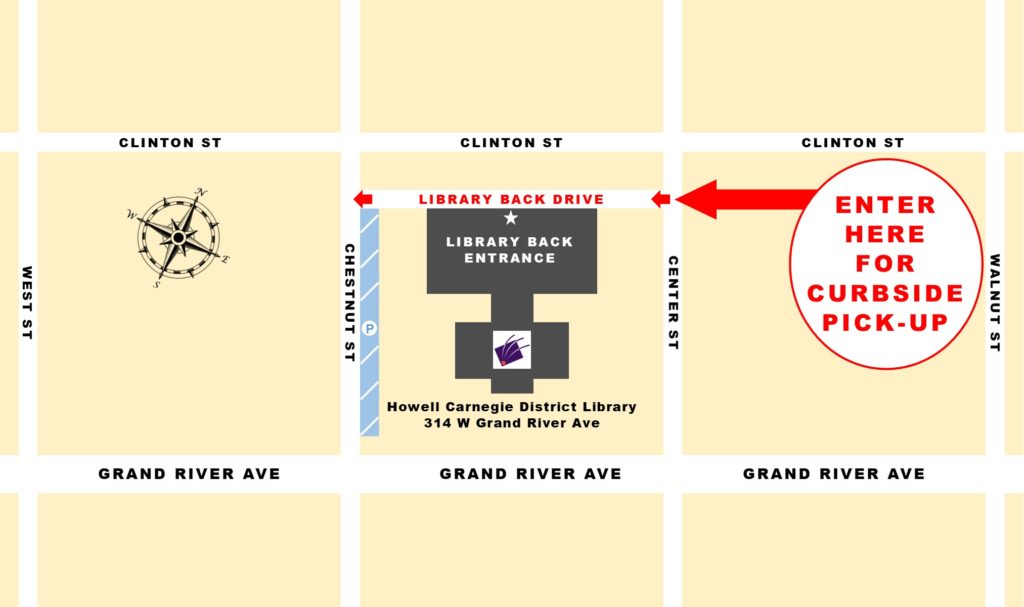
Enter the one-way back driveway (parallel to Clinton Street) from Center Street. Pull up next to the Curbside Pickup sign. Please stay in your car, and the staff will come outside to assist you. Curbside pickup is available during regular library hours.
24×7 Lockers
The lockers are available 24 hours a day, 7 days a week, and are accessible through the glass doors at the rear of the building. The location of the 24×7 Lockers is the same as curbside pickup. See the map for Curbside Pickup
How to Unlock Glass Doors

Press [*] button on keypad
Enter 4 digit code given to you by email or phone (example [1-2-3-4])
Press [#] button on keypad
If entered correctly, the red light will become green and doors will unlock. Please be aware that this is a one-time use code and will not allow for multiple entries.
How to Unlock Locker
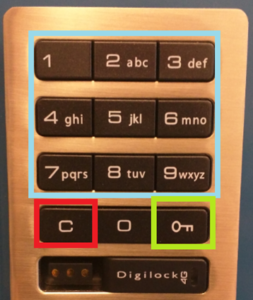
To open the locker enter the following sequence into the keypad located on the locker door:
Press [C] button on keypad
Enter 4 digit code given to you by email or phone (example[1-2-3-4])
Press [Key] button to unlock.
If entered correctly, the door will make a whirring sound and door will unlock. Once you have retrieved your items, please leave the door unlocked. You do not need to enter any further combinations.
If you have any difficulty accessing your locker and/or your designated door code does not work, call the front desk for assistance. during operating hours. If the library is closed, please contact or visit the library on the next available business day.